 Recur
Recur
Track what powers your life
Recur keeps every subscription in one place on your Mac. See what you pay each month, get a reminder before each charge, and spot where you could save.
One payment, no subscription. Try everything free for 14 days.
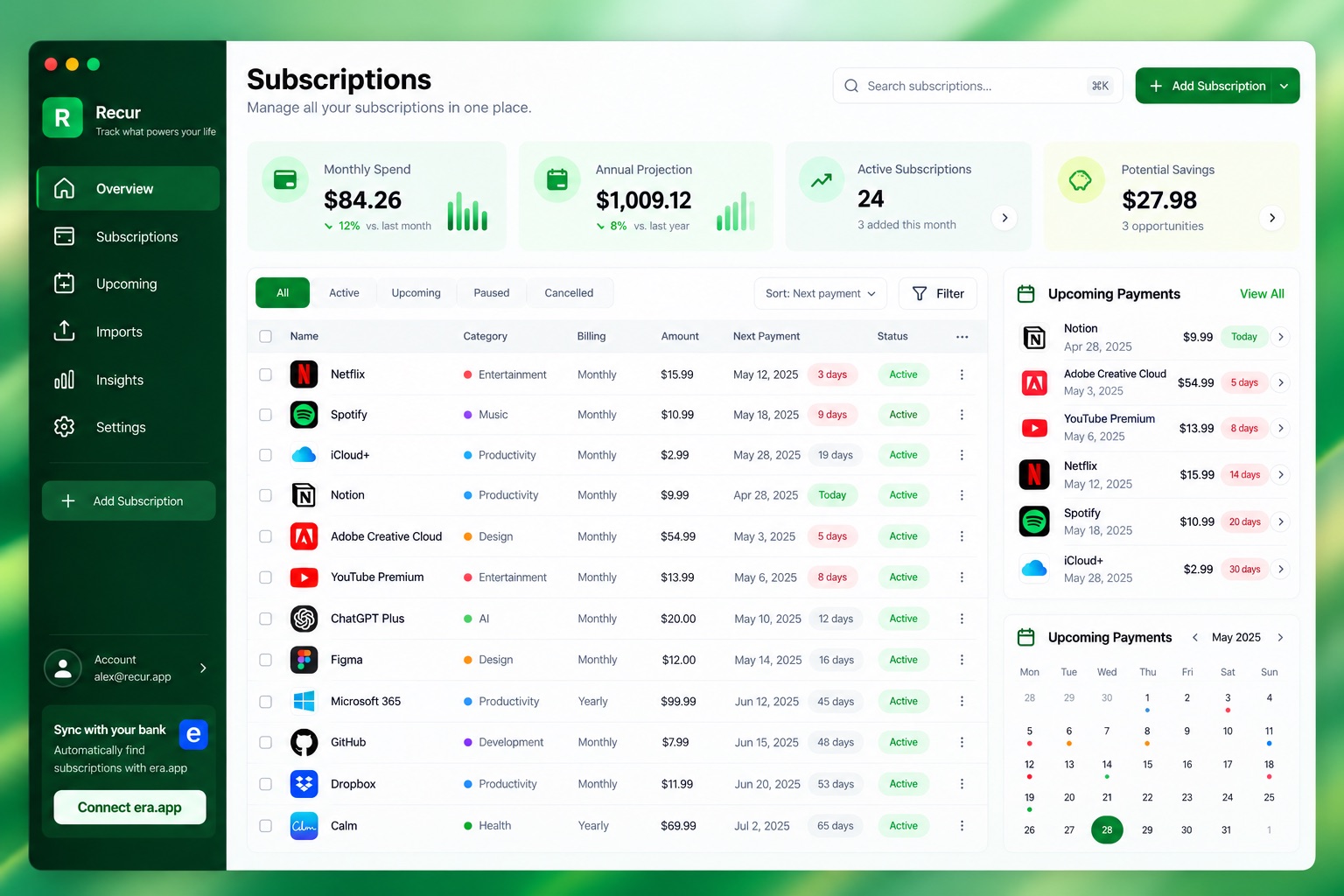
Everything you pay for, in one window
Add subscriptions by hand or pull them from a bank statement. Recur works out what is due and when.
-
All your subscriptions in a table
Search by name, filter by Active, Upcoming or Cancelled, and sort by any column. Cards at the top show your monthly spend, how many are active, what is due this week and your yearly total.
-
Quick to add by hand
Enter a name, price and billing cycle. Weekly, monthly, quarterly, yearly or every few days or months all work. Group them by category, such as Entertainment or Productivity.
-
See what is coming up
The Upcoming page lists payments due today, in the next 7 days and later this month, next to a calendar. Next payment dates move forward on their own.
-
A reminder before you pay
Pick how many days before a payment you want a nudge, and at what time. Reminders come from your Mac, so they work offline. Your next 3 payments can also sit in the menu bar.
-
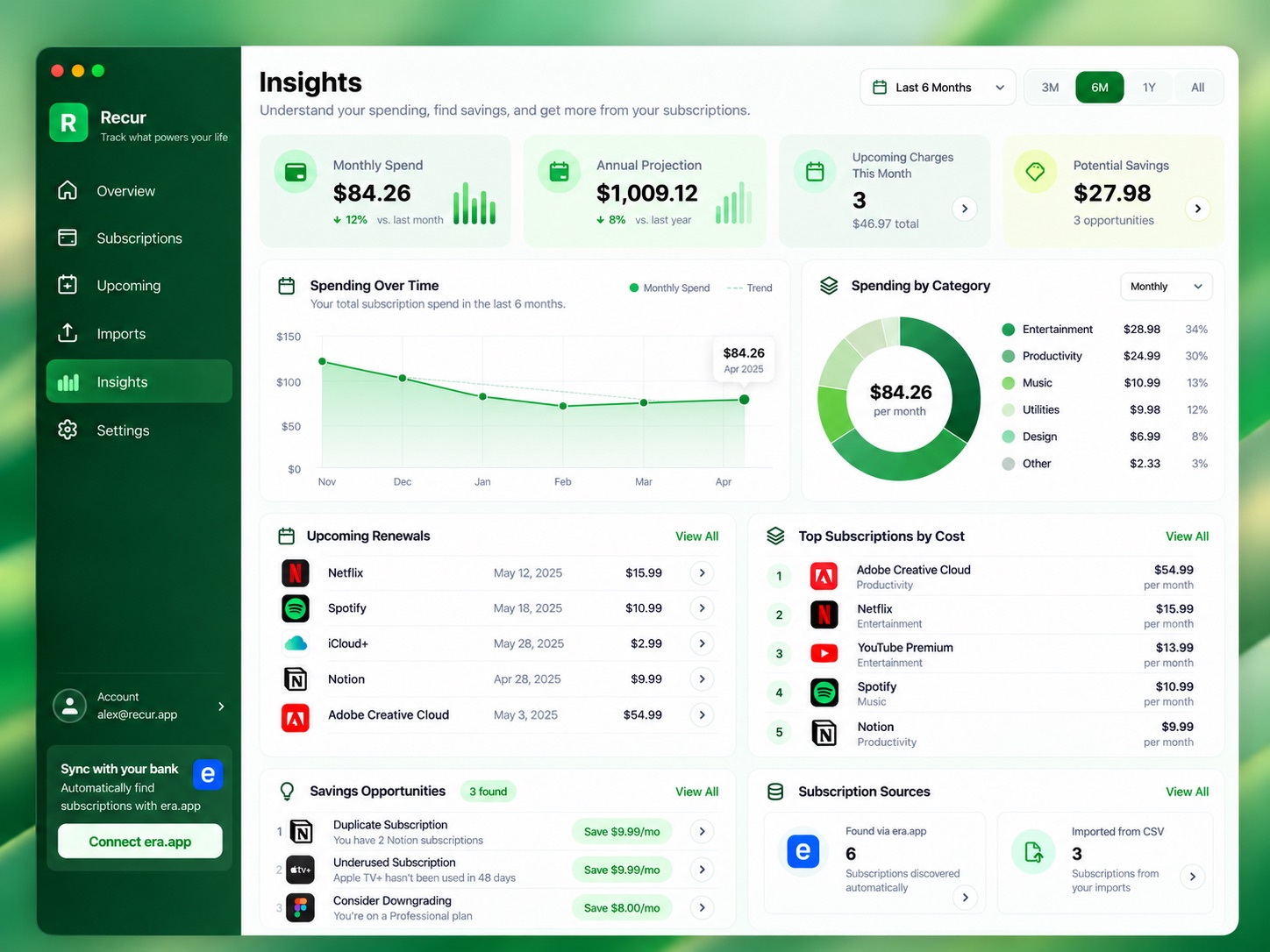
Insights and savings
Charts show your spending month by month and by category, plus your most expensive subscriptions. Recur also points out duplicates and where paying yearly could cost less.
-
Import a bank statement
Drop in a CSV file from your bank. Recur finds the payments that repeat and lets you tick the ones to add. Files from Monzo, Starling, Barclays, HSBC and Lloyds are set up for you.
Know where the money goes
Small monthly charges add up. Recur turns them into numbers you can act on.
- Monthly and yearly totals, worked out for every billing cycle.
- Spending by category, over the last 3, 6 or 12 months.
- Your top subscriptions by cost.
- Suggestions to save, such as two services that do the same job.
- Bank statements from other banks work too. Just match the columns.
- Bank sync through era.app Coming soon
Your money stays your business
Recur has no account to sign up for and no cloud copy of your data.
-
Kept on your Mac
Your subscriptions, payments and settings are saved on your Mac only. We never see them.
-
Statements read locally
When you import a bank file, Recur reads it on your Mac. The file is never uploaded anywhere.
-
No money data sent
The licence check sends only your licence key, an anonymous ID for the Mac and the Mac's name. Brand logos are looked up by subscription name, and you can turn them off.
Read the full privacy notice. It is short.
One price. Yours to keep.
A subscription tracker should not be another subscription.
Recur for Mac
£29
One-time purchase. No subscription.
- Every feature, with no limits
- Use it on up to 3 of your Macs
- 14-day free trial with everything on
- Licence key sent to you by email
- Needs macOS 15 or later
Secure payment by Stripe.
Questions
How does the free trial work?
Recur is fully working for 14 days from the first time you open it. You don't need to give a card or an email address. Buy a licence at any point to keep going.
What happens when the trial ends?
Recur turns read-only. You can still see all your subscriptions and insights, and reminders keep coming. Adding, editing, deleting and importing need a licence. Nothing is deleted.
How many Macs can I use it on?
One licence works on up to 3 Macs. Paste the same key into Recur on each one.
How do I activate my licence?
After you pay, we email your licence key. Open Recur, go to Settings, paste the key and click Activate.
Can I get a refund?
Yes. Email recur@kaizenhub.digital with the address you bought with, and we will sort it out. A refunded licence stops working.
Which version of macOS do I need?
macOS 15 (Sequoia) or later.
Where is my data kept?
On your Mac, and nowhere else. Bank files are read on your Mac and never uploaded. The licence check sends only your licence key, an anonymous ID for the Mac and the Mac's name. No amounts, dates or bank details ever leave your Mac. See the privacy notice for the details.
Does it work with my bank?
If your bank lets you download a CSV file, yes. Monzo, Starling, Barclays, HSBC and Lloyds files are recognised for you. For other banks, you tell Recur which column is the date, the name and the amount.